Is There an App to Send Reminders to People Who Didn't Accept Your Calendar Invite?
You've scheduled a meeting. You've sent the calendar invite. And now you're staring at a list of attendees where half of them show "No response."
Sound familiar?
You're not alone. One of the most common frustrations for anyone who organizes meetings — whether you're an executive assistant, a team lead, a project manager, or just someone trying to get five people in a room — is that people don't respond to calendar invitations. They don't decline. They don't accept. They just... don't.
So naturally, you start searching: is there an app that will automatically remind people who haven't accepted my calendar invite?
The short answer is yes. But let's talk about why this problem exists in the first place and what to look for in a solution.
Why people ignore calendar invites
It's rarely intentional. Most people don't look at a meeting invitation and think, "I'm going to leave this person hanging." What actually happens is more mundane:
- The notification gets buried. Calendar invites arrive alongside dozens of other emails and notifications. They're easy to miss, especially on mobile.
- They intend to respond later. Someone sees the invite during a busy morning, thinks "I'll deal with that after lunch," and forgets entirely.
- They assume showing up is the same as accepting. Some people treat calendar invites like FYI notices. They plan to attend but never click the button.
- They're unsure and put off deciding. If they're not 100% sure they can make it, the invite stays in limbo. Tentative feels like a commitment they're not ready to make.
Whatever the reason, the result for you is the same: you don't know who's coming to your own meeting.
The manual approach (and why it doesn't scale)
Most people deal with this the old-fashioned way. They check the invite a day or two before, see who hasn't responded, and start reaching out. A Slack message here. An email there. Maybe a text if it's really important.
This works when you have one meeting a week. It doesn't work when you have five, or ten, or twenty. At that point, you're spending real time — 15, 20, 30 minutes — just playing attendance coordinator for meetings that should be handling themselves.
And even when you do follow up, you're doing it manually every single time. There's no system. There's no consistency. And there's no guarantee you'll remember to do it at all.
What a good RSVP reminder app should do
If you're evaluating tools to solve this problem, here's what matters:
1. Automatic detection of non-responders. The app should connect to your calendar and know which attendees haven't responded without you having to check.
2. Timed reminders. A single nudge isn't always enough. The best tools send reminders at smart intervals — a week before, two days before, the morning of — until the person responds.
3. Polite, professional tone. The reminder goes to your colleagues and contacts. It needs to feel like a friendly nudge, not a passive-aggressive follow-up.
4. Works with your calendar. Google Calendar and Microsoft Outlook are where most invites live. The tool should integrate with both seamlessly.
5. No effort from you. The whole point is automation. If you have to manually trigger reminders or manage a list of non-responders, you've just traded one type of busywork for another.
CalNudge: built for exactly this problem
CalNudge was designed to solve this specific problem: automatically reminding attendees who haven't responded to your calendar invitations.
Here's how it works:
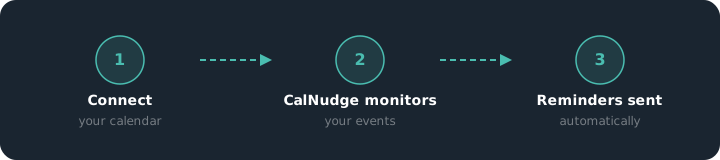
Connect your calendar. Sign in with your Google or Microsoft account and CalNudge syncs your upcoming events. No complicated setup — signing in is the setup.
CalNudge monitors your invites. For every meeting you've organized, CalNudge tracks who has accepted, declined, or not responded.
Automatic reminders go out. When someone hasn't responded, CalNudge sends them a polite, well-timed email reminder. The email includes the event details, the time in the correct timezone, and a clear call to action: open your calendar and click Accept or Decline.
You get a daily digest. Each morning, you receive a summary of your upcoming meetings — how many people accepted, how many are still pending, and which events might need your attention.
That's it. No spreadsheets, no manual follow-ups, no copying and pasting names into Slack. You schedule the meeting and CalNudge handles the rest.
What reminders actually look like
CalNudge reminders are designed to be short, clear, and non-pushy. Here's what an attendee sees:
- Subject: Quick reminder: [Meeting Title]
- Body: A friendly note mentioning the organizer by name, the event details with date, time, and timezone, and a simple instruction to open their calendar app and respond.
- Reply-to: The organizer's email, so the attendee can respond directly if they have questions.
The tone matters. Nobody wants to receive a robotic "ACTION REQUIRED: PLEASE RSVP" email. CalNudge reminders feel like a colleague gently saying, "Hey, just making sure you saw this."
What about built-in calendar features?
Google Calendar and Outlook both send notifications when you receive an invite. But these are one-time notifications that arrive at the moment the invite is sent. If someone misses it — or ignores it — there's no follow-up.
Neither Google nor Microsoft offers a built-in feature to automatically remind non-responders. You can manually re-send an invite, but that's just the manual approach dressed up as a feature.
Some people try workarounds like creating a recurring reminder for themselves to check RSVPs, or using task management tools to track follow-ups. These are creative solutions, but they still put the burden on you.
When automated reminders work best
Automated RSVP reminders are especially valuable when:
- You organize meetings with external attendees — clients, vendors, or partners who aren't in your immediate orbit and might deprioritize your invite.
- You run recurring meetings where the same people forget to respond every week.
- You're an executive assistant managing calendars for someone else and need to ensure their meetings are confirmed without constant back-and-forth.
- You plan events or workshops where accurate headcount matters for room booking, catering, or materials.
- You manage a team and need to know who's attending standups, reviews, or all-hands meetings without chasing people down.
The cost of not solving this
Every meeting where you don't know who's coming is a meeting at risk. You might book a room that's too large or too small. You might delay a decision because a key stakeholder didn't show. You might waste 30 minutes waiting for someone who was never planning to attend.
These are small costs individually. But they compound. Over weeks and months, the uncertainty adds up to lost time, wasted resources, and meetings that don't accomplish what they should.
An automated reminder removes that uncertainty before the meeting even starts.
Try it free
CalNudge is free for 30 days. Connect your Google Calendar or Microsoft Outlook account and start getting automatic RSVP reminders in under a minute.
No credit card. No complicated setup. Just fewer unanswered invites.
See how CalNudge works for sales teams, recruiters, and consultants & agencies.
Stop chasing RSVPs manually.
CalNudge automatically follows up with attendees who haven't responded — so you always know who's coming.
Get started free →